

RabbitMQ in Local .NET Development with Aspire
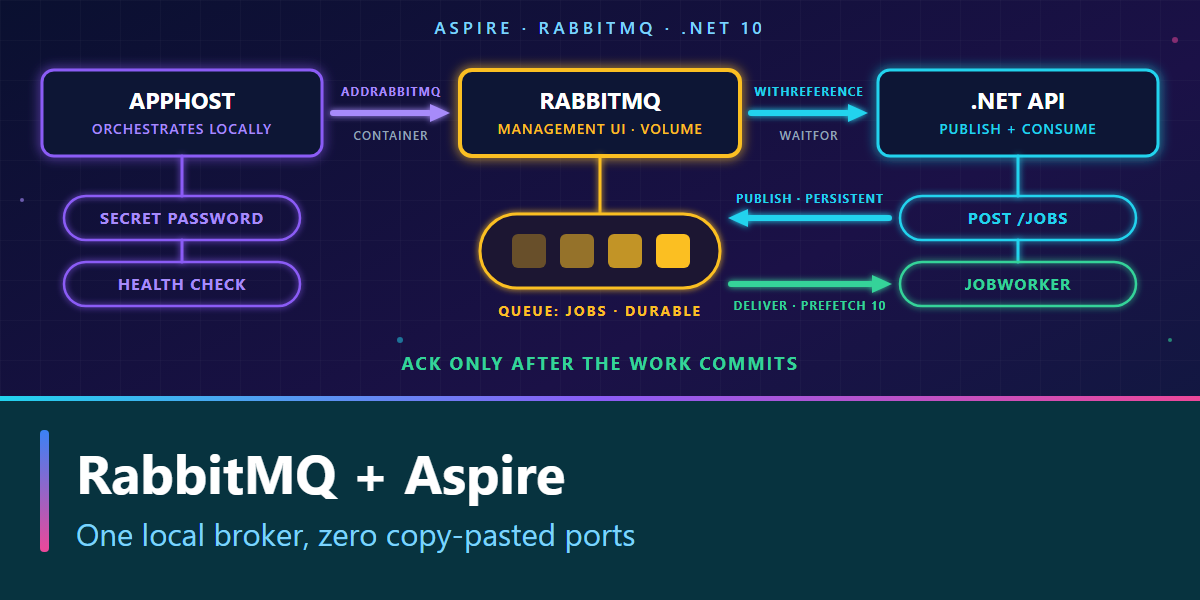
RabbitMQ in Local .NET Development with Aspire
"Start RabbitMQ first, copy the port, and don't forget the password" is not a useful onboarding guide. It is a list of things the next developer will get wrong.
For a local .NET application, Aspire can start the broker, manage its credentials, wait for it to be healthy and pass the connection to your app. Your app still decides what to publish, which queue to create and when to acknowledge a delivery. Keeping those responsibilities separate makes a small RabbitMQ experiment repeatable without pretending Aspire is a messaging framework.
This walkthrough builds one API that publishes jobs and runs a background consumer. It targets .NET 10 and the current Aspire RabbitMQ and RabbitMQ .NET client integrations.
Prerequisites and starting point
Install the .NET 10 SDK, Aspire CLI and a running, supported container runtime. RabbitMQ runs in a container; the .NET SDK alone cannot start it.
Create a starter app and add the broker hosting package to its AppHost and the client package to its API:
aspire new aspire-starter -n RabbitLab -o RabbitLab
cd RabbitLab
aspire add rabbitmq
dotnet add .\RabbitLab.ApiService\RabbitLab.ApiService.csproj package Aspire.RabbitMQ.Client
The starter also includes a web frontend and ServiceDefaults project. We will only use the AppHost and API in this exercise. Keep the Aspire packages on a compatible major version if your existing solution pins them centrally.
1. Declare RabbitMQ in the AppHost
Replace the generated RabbitLab.AppHost/AppHost.cs with:
var builder = DistributedApplication.CreateBuilder(args);

var username = builder.AddParameter("rabbitmq-username");
var password = builder.AddParameter("rabbitmq-password", secret: true);

var rabbitmq = builder.AddRabbitMQ("messaging", username, password)
    .WithManagementPlugin()
    .WithDataVolume(name: "rabbitlab-data");

builder.AddProject<Projects.RabbitLab_ApiService>("apiservice")
    .WithReference(rabbitmq)
    .WaitFor(rabbitmq);

builder.Build().Run();
AddRabbitMQ starts a local RabbitMQ container. WithReference provides ConnectionStrings:messaging to the API; messaging must match the name in the client registration below. WaitFor starts the API after the broker passes its health check. The named volume retains broker data when the container is replaced; omit it if you want every local run to start with an empty broker. The management plugin makes a UI endpoint available in Aspire's dashboard.
On the first run, Aspire prompts for rabbitmq-username and rabbitmq-password; choose a local username other than guest and a strong password. Use those same credentials to sign in to the management UI. Keep the password in Aspire's local secret configuration, not in a committed appsettings.json or a guest:guest connection string. The AMQP port is not necessarily 5672 on your host, so don't hard-code it.
2. Publish and consume from the .NET API
Replace RabbitLab.ApiService/Program.cs with this small, end-to-end example. The API registers the Aspire client once; dependency injection supplies IConnection to the endpoint and the worker.
using System.Text;
using RabbitMQ.Client;
using RabbitMQ.Client.Events;

var builder = WebApplication.CreateBuilder(args);
builder.AddServiceDefaults();
builder.AddRabbitMQClient(connectionName: "messaging");
builder.Services.AddHostedService<JobWorker>();

var app = builder.Build();
app.MapDefaultEndpoints();

app.MapPost("/jobs", async Task<IResult> (
    Job job, IConnection connection, CancellationToken ct) =>
{
    if (string.IsNullOrWhiteSpace(job.Text))
        return Results.BadRequest("Text is required.");

    await using var channel = await connection.CreateChannelAsync(cancellationToken: ct);
    await channel.QueueDeclareAsync(
        queue: "jobs", durable: true, exclusive: false, autoDelete: false,
        arguments: null, cancellationToken: ct);

    await channel.BasicPublishAsync(
        exchange: string.Empty,
        routingKey: "jobs",
        mandatory: true,
        basicProperties: new BasicProperties { Persistent = true },
        body: Encoding.UTF8.GetBytes(job.Text),
        cancellationToken: ct);

    return Results.Accepted();
});

app.Run();

public sealed record Job(string Text);

public sealed class JobWorker(
    IConnection connection, ILogger<JobWorker> logger) : BackgroundService
{
    protected override async Task ExecuteAsync(CancellationToken stoppingToken)
    {
        await using var channel = await connection.CreateChannelAsync(
            cancellationToken: stoppingToken);
        await channel.QueueDeclareAsync(
            queue: "jobs", durable: true, exclusive: false, autoDelete: false,
            arguments: null, cancellationToken: stoppingToken);
        await channel.BasicQosAsync(
            prefetchSize: 0, prefetchCount: 10, global: false,
            cancellationToken: stoppingToken);

        var consumer = new AsyncEventingBasicConsumer(channel);
        consumer.ReceivedAsync += async (_, delivery) =>
        {
            var text = Encoding.UTF8.GetString(delivery.Body.Span);
            logger.LogInformation("Processed job: {Job}", text);
            await channel.BasicAckAsync(
                delivery.DeliveryTag, multiple: false, cancellationToken: stoppingToken);
        };

        await channel.BasicConsumeAsync(
            queue: "jobs", autoAck: false, consumer: consumer,
            cancellationToken: stoppingToken);
        await Task.Delay(Timeout.Infinite, stoppingToken);
    }
}
The code uses the RabbitMQ .NET client's async channel, publish and consumer APIs. The publisher declares the queue before sending, so the default exchange can route to the queue named jobs; the worker declares the same topology so it can start first. The queue is durable and the published message is persistent: these are two different settings.
The worker uses a manual acknowledgement (autoAck: false) and a prefetch of 10: RabbitMQ hands this consumer at most ten unacknowledged messages at a time. Without BasicQosAsync the broker pushes as many as it can, and a slow handler piles them up as Unacked in memory instead of leaving them Ready for another worker. The example's entire "job" is a log entry; in a real handler, replace the log line with the durable business operation and acknowledge only after it commits. If the handler crashes before that point, RabbitMQ may deliver the message again: make the operation idempotent. Keep malformed jobs out of infinite requeue loops with an explicit dead-letter policy.
3. Run and check it locally
From the RabbitLab directory:
aspire run
Enter the local username and password when Aspire prompts you. Open the dashboard URL printed in the terminal. Check that messaging and apiservice are healthy; open the management UI endpoint on the broker resource and log in with the credentials you entered. Copy the API's HTTP endpoint from the dashboard and try one job:
$api = "http://localhost:<API-port-from-dashboard>"
$response = Invoke-WebRequest -Uri "$api/jobs" -Method Post `
    -ContentType "application/json" -Body '{"text":"ship order"}'
if ($response.StatusCode -ne 202) { throw "Publish did not return HTTP 202." }
The API should return 202 Accepted; the API resource log should show Processed job: ship order. In RabbitMQ management, open Queues and Streams › jobs. With the worker running, the message is consumed almost immediately, so Ready stays at zero; that's expected. To watch a message wait for a consumer:
- Stop
apiservicefrom the Aspire dashboard. The broker keeps running. - On the
jobsqueue page, expand Publish message, set Delivery mode to 2 - Persistent, type a payload and select Publish message. - The queue now shows Ready: 1, because nothing is consuming it.
- Start
apiserviceagain. The worker picks the message up, Ready returns to zero and the API log showsProcessed job: ….
A message that stays Unacked instead means a consumer received it and has not acknowledged it yet: look at the handler, not at the publisher.
If the API never starts, check that your container runtime is running, that the broker health check passes and that WithReference(rabbitmq) and AddRabbitMQClient("messaging") use the same name. If a previously created queue has different durability settings, use a new queue name or remove the old local queue intentionally; RabbitMQ rejects a declaration that changes an existing queue's parameters.
What Aspire does not do
| Aspire gives you locally | Your application still owns |
|---|---|
| Container, generated credentials, connection injection, health and management endpoint | Exchanges, queues, routing, message contracts, retries and dead letters |
| A stable broker volume when you ask for one | Consumer idempotency and acknowledgement after committed work |
An injected IConnection and client telemetry |
Publisher confirms when broker acceptance must be known |
The example opens a channel per HTTP request to stay readable. That is enough for a local smoke test; at sustained publish rates, reuse long-lived publisher channels safely instead of making one per request. Persistent messages and a durable queue alone do not give an end-to-end exactly-once guarantee: publisher confirms, handling unroutable messages, idempotent consumers and a production-grade broker deployment are separate decisions. Aspire's local container and volume are not a production RabbitMQ cluster.
For the next layer, see idempotent message handling and the Outbox pattern. The RabbitMQ fanout video covers the point where one queue is no longer enough.
References: Aspire RabbitMQ hosting, Aspire RabbitMQ client integration, RabbitMQ .NET work queues and publisher confirms.